POS
Clothing store POS software: sizes, colours and seasons
Why a garment shop needs stock by size and colour, barcode tags, quick exchanges and clean season sales.
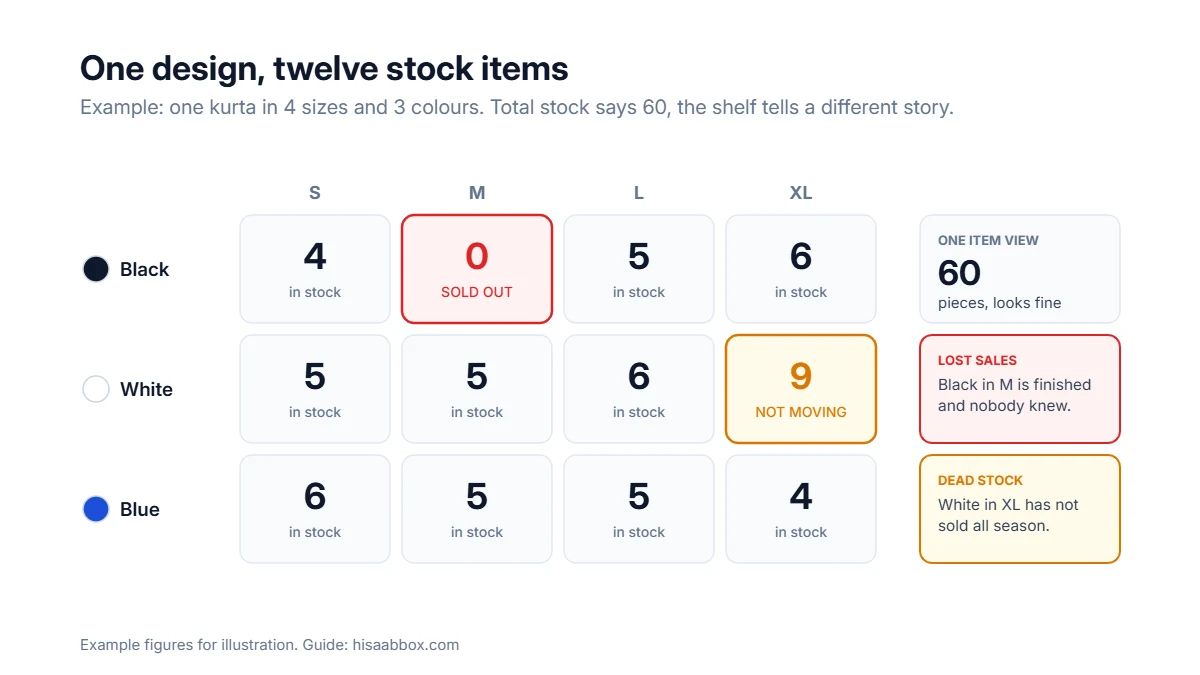
A clothing shop does not sell "a shirt". It sells a blue shirt in medium, and the customer who wanted large walks out if large is finished. That one fact makes garment retail different from a general store, and it is the reason ordinary billing software struggles in a boutique, a shoe store or a kids' wear shop.
The real problem: one design, many sizes and colours
Take one kurta design in four sizes and three colours. That is twelve different items on your shelf. If the software treats them as one item with a stock of 60, you will never know that medium in black sold out last week while extra large in white has not moved at all. Good clothing store software keeps a separate count for each size and colour, and still shows you the design as one product in reports.
Features a clothing shop should look for
1. Sizes and colours created in one step
You enter the design once, choose the sizes and colours, and the software creates every combination with its own stock and barcode. Entering twelve items by hand for every design is the point where most shops give up on software.
2. A barcode tag on every piece
Each piece carries a tag with its barcode, size and price. At the counter the cashier scans the tag and the exact size and colour go on the bill. No searching, no wrong size on the receipt. See our guide on setting up a barcode system for the printer and labels you need.
3. Exchange in one step
Eid shopping means exchanges the next day. The cashier should scan the returned piece, scan the new one, and the software should work out the difference, put the old piece back in stock and take the new one out, all on one bill.
4. Season discounts without changing prices by hand
For an end-of-season or Eid sale you should be able to apply a discount to a category or a whole collection for a set period. When the sale ends, prices return on their own.
5. Low-stock alerts by size
An alert that says "Kurta design 114: low stock" is not enough. You need "design 114, medium: 2 left". That tells you exactly what to reorder from the supplier or the factory.
6. Cost price hidden from cashiers
Sales staff need selling prices, not your margins. Cashier accounts should not show cost price or profit, and should not be able to change a price without the owner's permission.
7. Reports that show what actually sells
Which designs sold out, which sizes are left over at the end of the season, which colours never move. These reports decide what you order next season, and they are the real return on the software.
General billing software vs clothing POS
| Need | General billing software | Clothing store POS |
|---|---|---|
| Stock by size and colour | Usually no | Yes |
| Barcode per variant | Manual | Created automatically |
| Exchange on one bill | Return, then new sale | One step |
| Size-wise low stock | No | Yes |
| Season and collection reports | Limited | Yes |
Setting up before the season starts
- Agree on your sizes. Decide whether you use S, M, L or 38, 40, 42 and keep it the same for every design.
- Enter new stock as it arrives. Print tags for each delivery before it reaches the shelf.
- Tag old stock in stages. Start with the current season. Clear last season's stock on sale rather than tagging all of it.
- Count one category a week. A short weekly count keeps the numbers honest. Our article on managing shop inventory explains how.
If you also stitch
Shops that sell unstitched cloth and take stitching orders need measurements, bookings and karigar payments as well. That is a different kind of system, which we describe in tailoring shop software.
What to do next
Take three of your own designs and ask the seller to enter them, print tags, sell one and exchange it while you watch. HisaabBox POS was built for fashion shops in exactly this way, and you can request a demo account to try it with your own designs.
Common questions
Why does a clothing shop need special POS software?
Because one design comes in many sizes and colours. The software must keep separate stock and a separate barcode for each size and colour, which general billing software usually cannot do.
How do I barcode clothes that have no barcode?
The POS software generates a code for each size and colour and prints it on a tag or label with the price. The tag is attached to each piece.
How are exchanges handled in clothing store software?
The cashier scans the returned piece and the new piece on one bill. The software returns the old item to stock, removes the new one and calculates the difference.
More guides

Zubair Aslam builds the POS, billing and inventory software shown on this site. Get in touch