Guides
Thermal printer 58mm vs 80mm: which receipt printer should you buy?
The difference between 58 mm and 80 mm receipt printers, and which one fits your shop.
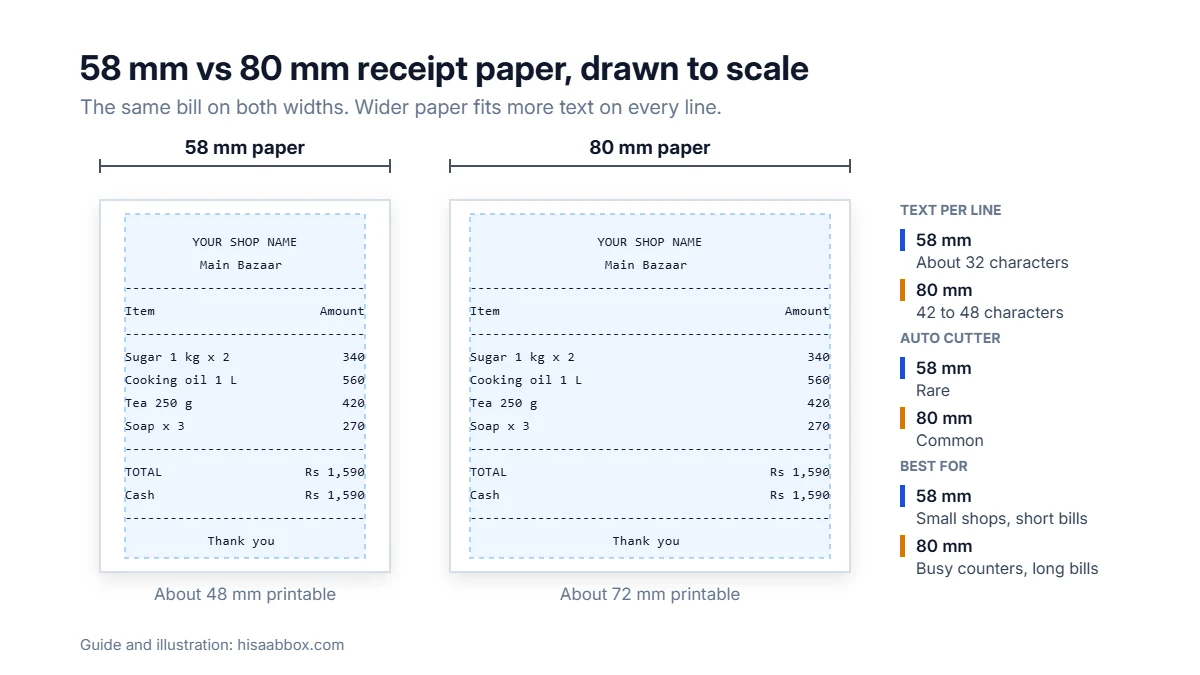
When you set up a POS, the first hardware question is nearly always the same: should I buy a 58 mm or an 80 mm thermal printer? The numbers are simply the width of the paper roll. The choice affects how your receipt looks, how fast it prints and how much you spend on paper.
How a thermal printer works
A thermal printer uses heat on special paper instead of ink. There is no cartridge or ribbon to replace. You only buy paper rolls. That is why almost every shop, restaurant and pharmacy uses one for receipts.
58 mm vs 80 mm at a glance
| 58 mm | 80 mm | |
|---|---|---|
| Paper width | 58 mm | 80 mm |
| Printable width | About 48 mm | About 72 mm |
| Text per line | Around 32 characters | Around 42 to 48 characters |
| Printer price | Lower | Higher |
| Paper cost | Lower | Higher |
| Auto cutter | Rare, usually tear by hand | Common |
| Speed | Slower | Faster |
| Best for | Small shops, short bills | Busy counters, restaurants, long bills |
When 58 mm is the right choice
A 58 mm printer suits a small shop, kiosk or tuck shop where bills are short and budget matters. The printer is small and cheap, and the rolls cost less. The limit is space. Long product names get cut into two lines and there is little room for a logo or extra details.
When 80 mm is the right choice
An 80 mm printer suits a supermarket, pharmacy, restaurant or any counter with a queue. The wider paper fits the item name, quantity, rate and amount on one line, so the receipt is easier to read. Most 80 mm printers also have an automatic cutter, which matters when you print hundreds of receipts a day or several slips at once.
Things people forget to check
- Connection. USB is the simplest. Network (LAN) printers are useful for a kitchen. Bluetooth is for phones and tablets.
- Cutter. If you want separate slips for the customer and the kitchen, you need an auto cutter.
- Cash drawer port. Many printers can open a cash drawer when a receipt prints.
- Paper availability. Both sizes are easy to find, but check your local market.
Setting up the printer for a web POS
- Install the printer driver and print a test page.
- In the printer preferences, set the paper size to 58 mm or 80 mm. If it is not listed, add a custom paper size with that width.
- In the browser print window, choose the thermal printer, set margins to None and switch off headers and footers.
- In your POS settings, choose the same receipt width.
Most printing problems, such as huge margins, tiny text or half the receipt missing, come from a paper size that does not match in one of those places.
What a good receipt should show
- Shop name, address and phone number
- Bill number, date and time
- Items with quantity, rate and amount
- Discount, total, amount paid and change
- A thank-you line or return policy
Our recommendation
If your budget allows, buy an 80 mm printer with an auto cutter. The receipts look more professional and it handles busy hours better. Choose 58 mm when bills are short and cost is the main concern. Our POS software prints on both sizes as well as A5 and A4. If you are also setting up scanning, read how to set up a barcode system for your shop.
Common questions
Is a 58mm or 80mm thermal printer better for a shop?
An 80mm printer is better for busy counters and long bills because it fits more on each line and usually has an auto cutter. A 58mm printer is cheaper and fine for small shops with short bills.
Do thermal printers need ink?
No. Thermal printers use heat on special paper, so there is no ink or ribbon. You only buy paper rolls.
Why does my thermal receipt print with big margins?
The paper size in the printer settings or browser does not match the roll. Set the paper to 58mm or 80mm and set browser margins to None.
More guides

Zubair Aslam builds the POS, billing and inventory software shown on this site. Get in touch