POS
Mobile shop software in Pakistan: IMEI, repairs and accessories
Phones by IMEI, used phone purchases, repair job cards and accessories: one system for the three businesses inside a mobile shop.
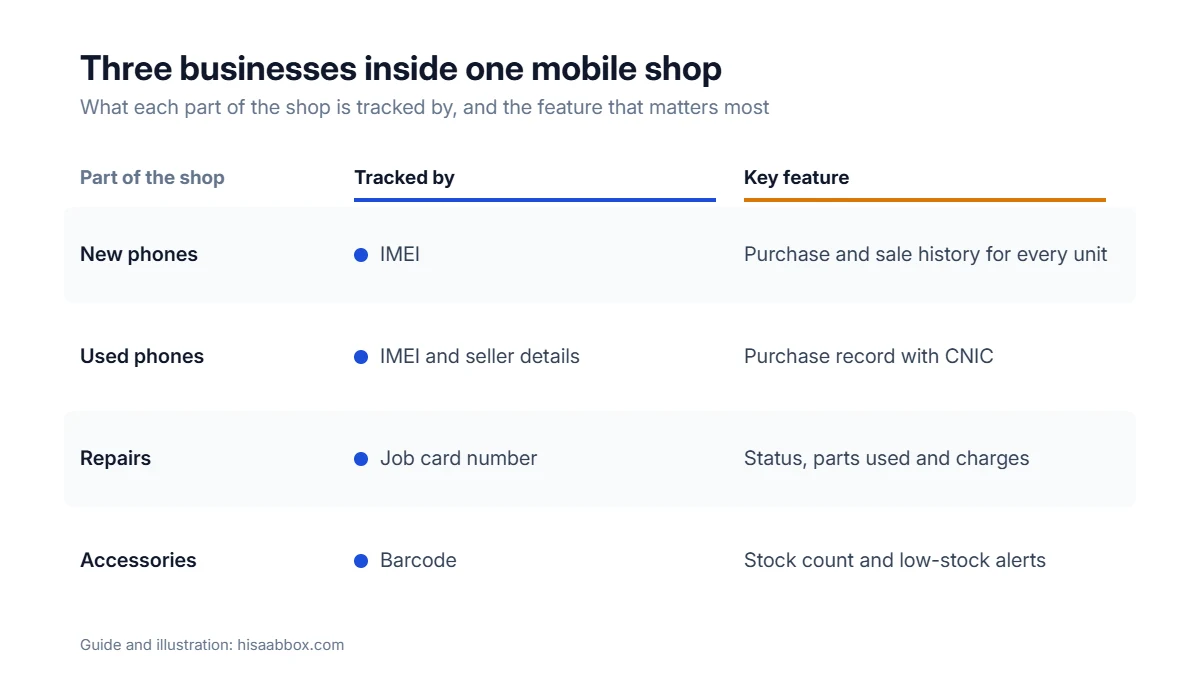
A mobile shop looks like one business from the street. Behind the counter it is three. You sell phones, where every unit has its own IMEI and a wrong entry can cause real trouble. You sell accessories, hundreds of small items with good margins and constant stock loss. And you run a repair desk, where a customer's phone sits in a drawer for days and somebody must remember whose it is and what was promised.
Software for a mobile shop has to handle all three in one place. Here is what to look for.
1. Phones: every unit tracked by IMEI
A phone is not like a charger. Two phones of the same model are two different items, because each has its own IMEI number.
- IMEI at purchase. When stock arrives, each phone is entered with its IMEI, cost and supplier. Scanning the barcode on the box makes this quick.
- IMEI on the bill. When a phone is sold, the cashier picks or scans that exact IMEI. It prints on the customer's receipt.
- Search by IMEI. Type an IMEI and see when the phone came in, from whom, what it cost, when it was sold and to which customer. This settles warranty claims and disputes in a minute.
- Profit per phone. Because each unit has its own cost, you see the real margin on every sale.
2. Used phones
Many shops buy phones from walk-in customers and resell them. This is where records matter most.
- Record the seller's name, CNIC number and phone number with every used phone you buy.
- Save the IMEI and the condition of the phone at the time of purchase.
- Keep the purchase price against that unit, so profit is correct when it sells.
If a question is ever raised about a handset, a complete purchase record protects the shop.
3. Repairs: a job card for every phone
The repair desk fails when it runs on memory and sticky notes. A job card system fixes that.
- Receive. Create a job card with the customer's name and number, the phone model, the fault and the estimated charges. Print a slip for the customer.
- Work. The job moves through stages such as received, in progress, waiting for parts and ready.
- Parts. Any part used, such as a screen or battery, is taken out of stock and added to the job.
- Deliver. When the customer returns with the slip, you find the job, take payment and close it.
At any moment you can see how many phones are in the shop for repair, which are ready and which have been waiting too long.
4. Accessories: small items, real money
Covers, glass protectors, chargers, cables and handsfree sets are where a mobile shop makes its daily margin, and where stock quietly disappears.
- Give every accessory a barcode. If it has none, print a label. Our barcode setup guide shows how.
- Sell every piece through the software, even the cheapest cable.
- Use low-stock alerts so fast sellers never run out.
- Count one category every week. See how to manage shop inventory.
5. Warranty, udhaar and daily closing
- Warranty. The receipt should show the warranty period, and the sale should be easy to find later by IMEI or phone number.
- Credit customers. Dealers and regular customers often pay later. Keep their accounts in the same system. Read more in udhaar khata on software.
- Daily closing. At night, see sales from phones, accessories and repairs separately, cash in hand, expenses and profit.
What each part of the shop needs
| Part of the shop | Tracked by | Key feature |
|---|---|---|
| New phones | IMEI | Purchase and sale history per unit |
| Used phones | IMEI and seller details | Purchase record with CNIC |
| Repairs | Job card number | Status, parts used and charges |
| Accessories | Barcode | Stock count and low-stock alerts |
Mistakes to avoid
- Using plain billing software that treats ten phones of one model as "quantity 10" with no IMEI.
- Keeping repairs in a separate notebook, so repair income never appears in the day's total.
- Letting staff sell accessories without a bill "because it is only a cable".
- Entering used phones without the seller's details.
What to do next
Ask any seller to show you three things on screen: a phone sold by IMEI, a repair job from receiving to delivery, and the day's profit split by phones, accessories and repairs. At HisaabBox, Universal POS includes serial and IMEI numbers and a repairs desk with job cards. Ask for a demo account and try it with a few of your own handsets.
Common questions
Why is IMEI tracking important in mobile shop software?
Every phone has a unique IMEI. Recording it at purchase and on the sale bill lets you trace any handset, settle warranty claims and see the profit on each unit.
How does software manage mobile repairs?
Each phone received for repair gets a job card with the customer, fault and estimate. The job moves through stages until delivery, and parts used are taken out of stock.
Can one software handle phones, accessories and repairs together?
Yes. A POS with serial or IMEI tracking, barcode stock and a repairs desk covers all three, with one daily closing report.
More guides

Zubair Aslam builds the POS, billing and inventory software shown on this site. Get in touch